Physical Address
304 North Cardinal St.
Dorchester Center, MA 02124
Physical Address
304 North Cardinal St.
Dorchester Center, MA 02124

Travel should feel seamless.
Not always smooth, not always perfect—but less friction, more flow.
One of the smallest but most powerful changes I’ve made to my travel rhythm is getting a local eSIM when traveling internationally. No airport SIM kiosks. No $10/day roaming charges (yes T-Mobile, I’m talking about you!) No swapping tiny plastic cards while jet-lagged in a taxi queue.
But a question I get often—and one I had too, in the beginning—is this:
I don’t understand any of the tech jargons on all these eSIM guides. Can someone just please in plain English how does this whole thing works?
Don’t worry. I’ll walk you through what that actually means, how it works, and how I set mine up before nearly every overseas flight.
An eSIM (embedded SIM) is a tiny chip already built into modern phones (iPhones, Pixels, etc.). It replaces the need for a physical SIM card by allowing you to digitally download a mobile plan from a provider abroad.
Instead of fiddling with a paperclip and SIM tray, you scan a QR code, and you’re connected to a local network within minutes.
To do that, you need something called an eSIM profile, which becomes your virtual internet provider when overseas. Once installed, it behaves just like a regular SIM.
Many installation manuals will mention these two concepts. This refers to the two distinct steps in setting up an eSIM:
First step is installation.
This is when you scan a QR code (or input details manually) and your phone downloads the eSIM profile to your phone, and you can see the eSIM on your phone’s setting page. I strongly recommend you do this at home or before traveling to your destination where you already have stable network to download the eSIM.
But here’s the nuance: on iPhones, especially with recent iOS versions, most likely you’ll be prompted:
“Your new eSIM from XXX is ready to activate”
I know what you’re thinking- Phil, didn’t you just say the first step is installation? Where is that??
That’s the moment people hesitate. You’re still at home. You don’t want to start the plan too early. Understand. But this simply means the eSIM downloaded to your phone, and ready to be activated. There’s a difference between activating your eSIM versus activating your actual data plan, and I will explain in more details later.

However, in any case, double check with the eSIM provider. Most likely, they won’t charge you any fees for activating your eSIM, but still check with them.
Once your eSIM has been activated, you should see the eSIM on your phone’s settings page. For iPhone users, you know this step is completed when you see your new eSIM shows “activating…”)
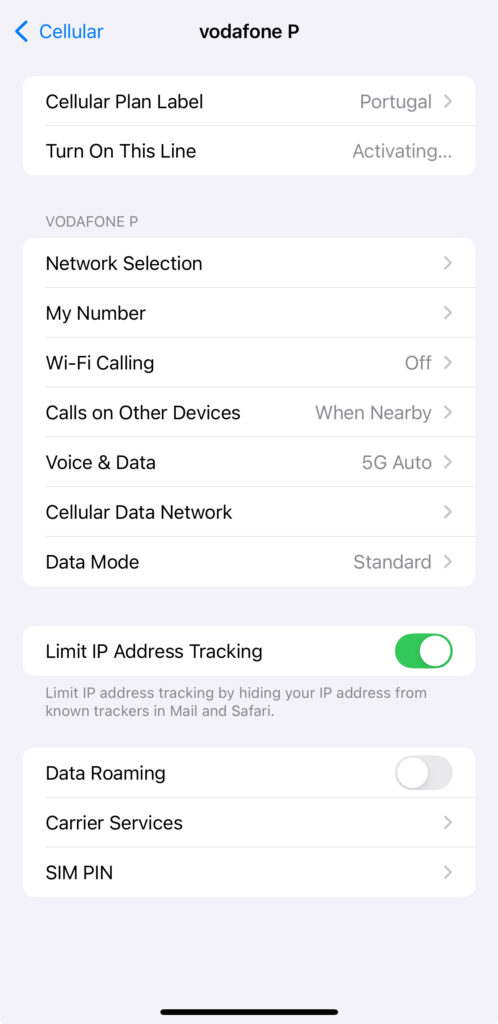
Then, the next step is activation: This is when the carrier actually turns on your plan so you can use data, calls, or texts.
In most cases, yes—but there’s a catch.In most cases, yes—but there’s a catch.
When your iPhone asks, “Activate this eSIM now?”, what it really means is: “Should I try to connect this profile to a mobile network?”
If you’re not in the destination country yet—or there’s no supported network nearby—that activation process usually won’t complete, and your plan won’t start ticking. So yes, you can often install the eSIM ahead of time and still preserve your plan for later.
But here’s the tricky part:
Some providers start the plan countdown the moment you install the profile, regardless of whether it actually connects to a network. That’s why I always check:
The distinction matters.
Think of it this way:
Most travel eSIMs won’t start your plan until your phone connects to the carrier’s network in your destination country. So yes—you can usually install now and activate later, as long as your provider supports it.
Just don’t go by assumptions or secondhand advice—always double-check the plan’s terms before your trip.
Here’s the method I use before every international trip:
If you want to check whether your eSIM installed properly:
Small systems like this—installing a local eSIM ahead of time—make travel lighter.
It’s one less decision when you’re tired. One less barrier between you and the street outside the airport.
There’s no magic in it. Just preparation, understanding, and letting the tools do their quiet work in the background.